
Cricut Maker 5
$399.00 at Amazon
Check it on AmazonPrice as of Nov 16, 2026, 5:34 AM EST
Details ↓Choose a Cricut machine by the materials you want to cut, the size of your designs and the tools your projects need.[14]

As an Amazon Associate I earn from qualifying purchases. How this site earns
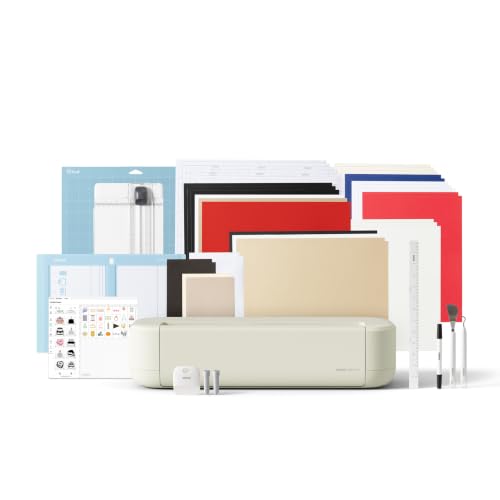
Cricut Maker 5, Slate BlueMy top pick is the Cricut Maker 5: it cuts a full 12 in. wide without a mat, works with 13 tools and cuts or engraves up to 3 mm. If you sew or work in leather and have the desk room, the Maker 4 supports the same number of tool types. If you cut vinyl, iron-on and cardstock, get the Explore 5.[14]
Each is a 12-inch Cricut, compared spec for spec from Cricut’s own pages.[15]

Prices can change. Confirm the current price on Amazon.
Width decides the biggest decal, banner or shirt design you can cut in one piece. Here is every current Cricut, drawn to one scale.[14]
The three picks all cut close to 12 in. wide without a mat when you use Cricut Smart Materials, and they run one cut up to 12 ft long. That’s enough for a 12 in. wall decal or a long banner in one piece.[14]
The Joy 2 stops at 4.5 in., which suits labels and card fronts. The Joy Xtra reaches 8.5 in., the width of a Letter sheet.[16]
The Venture doubles the picks at 24 in. and repeats cuts up to 75 ft, but it weighs 34.7 lb and Cricut calls it a professional machine. It’s a different kind of buy, covered further down.[17]
If your designs fit on a Letter sheet, any machine from the Joy Xtra up will do. If you want 12 in. vinyl, pick one of the three below.[18]
Prices can change. Confirm the current price on Amazon.
You want one machine for vinyl, paper, fabric, 3 mm leather or foam core board, and engraved metal tags.[19]
The Maker 5 is Cricut’s newest Maker. The listing names Cricut model 8003318.[23]
It’s the only pick that cuts a full 12 in. wide without a mat. Load Cricut Smart Materials and it runs one cut up to 12 ft long. On a mat, Cricut lists 11.5 × 11.5 in. on the small mat and 11.5 × 23.75 in. on the large one.[19]
Thickness is where it pulls ahead of the Maker 4. Cricut says its Knife Blade cuts up to 3 mm, like leather and foam core board, and its Engraving Tool engraves metal and acrylic up to 3 mm. The Knife Blade is sold separately; the selected Essential Bundle lists an Engraving Tool. The Maker 4’s Knife Blade stops at 2.4 mm.[26]
It works with 13 tools, tied with the Maker 4 for the most of any Cricut, and cuts 300+ materials. The tool list includes the Rotary Blade for cotton, fleece and denim, plus debossing, perforating and wavy-edge tools. It does all eight jobs on Cricut’s compare chart.[27]
Cricut says it’s 30% more compact than previous models. It measures 19.8 × 7.5 × 4.7 in. and weighs 10.9 lb on its product page, about 4.5 lb less than the Maker 4. A snap-in pen holder takes the pens and markers.[22]
In the box, per Cricut: the Premium Fine-Point Blade (already installed), a Scoring Tool, a dual-sided marker, a 12 × 12 in. Light Grip mat, cables and practice materials. Amazon’s bundle bullet also names an Engraving Tool, and Cricut’s current bundle-comparison panel also lists one. The introductory included-items list describes a different starter configuration, so use the selected bundle’s item list.[23]
You’ll need a phone, tablet or computer with Bluetooth and a high-speed connection to run Design Space. Cricut says the Maker 5 isn’t intended for children 12 and younger. The warranty is Cricut’s 1-year limited warranty for machines from its authorized sellers.[24]
My call: the most capable desktop Cricut.[20]
Prices can change. Confirm the current price on Amazon.
You sew, quilt or work in leather and balsa wood, and the machine can stay set up on one table.[28]
The Maker 4 is the Maker that came before the Maker 5, and Cricut’s Maker shop still sells both. The listing names model 8002707, and its 22.1 × 7.1 × 6.2 in. size matches Cricut’s.[26]
Like the Maker 5, it supports 13 tool types and 300+ materials. Confirm the exact blade and housing compatibility before moving an accessory between machines. That includes the Rotary Blade for fabric, the Knife Blade for chipboard and balsa wood, and the Engraving, Debossing and Perforation tips. Only the fine-point blade and a pen come in the box; the rest are sold separately.[27]
Cricut lists its Knife Blade at 2.4 mm, against 3 mm on the Maker 5. Cricut’s compare chart puts leather and softwood at up to 2.4 mm and chipboard at up to 2 mm, so the usual Maker materials fit under that limit.[27]
Without a mat, it cuts 11.7 in. wide and up to 12 ft long with Smart Materials. On the large mat, Cricut lists 11.5 × 23.5 in. Cut speed is up to 14.1 ips, and Cricut says it cuts and writes up to 2X faster than the previous model when you use a mat.[28]
It’s the heaviest pick at 15.4 lb, and the widest at 22.1 in. Give it a fixed spot on a table rather than lifting it in and out of a cupboard for each project.[29]
In the box, per Cricut: the Premium Fine-Point Blade and housing, a 12 × 12 in. Light Grip mat, a 0.4 mm Fine Point Pen, a Mini Weeder and practice materials. Amazon’s bundle adds a materials sampler and 30 bonus images in Design Space. Cricut also sells it in Sage, in selected markets.[31]
It connects over Bluetooth to Design Space, which Cricut lists for iOS, Android, Mac and Windows. Print Then Cut works with most inkjet printers, per the listing. The warranty is Cricut’s 1-year limited warranty, like every Cricut machine from an authorized seller.[32]
My call: the full Maker tool set if you have the desk room. The trade-offs are its size and the 2.4 mm limit.[29]
Prices can change. Confirm the current price on Amazon.
Your projects are vinyl decals, iron-on shirts, cards and full-color stickers, and you want the lightest 12-inch Cricut.[33]
The Explore 5 is the newest machine in Cricut’s Explore line, which Cricut calls its best-selling cutting machine.[33]
It shares the Maker 5’s new body. Cricut’s compare chart lists both at 19.8 × 7.5 × 4.7 in., and the Explore 5 at 10 lb. Cricut says it’s 30% more compact than previous models, and it has the same snap-in pen holder.[25]
It cuts at 14.1 ips and runs Smart Materials up to 12 ft long without a mat. Cricut’s chart lists the width as 11.7 in., while the product page promises 12 in. cutting performance. This guide uses the lower figure.[34]
The trade is range. Cricut lists 100+ materials against 300+ on the Makers, and its thickest cut is 1.5 mm with the Deep Cutting Blade, for craft foam, rubber sheets and magnet sheets. It can’t engrave, deboss or perforate, and it doesn’t take the Rotary Blade or the Knife Blade.[33]
Cricut’s page says “works with six tools” in one place and “works with 5 tools” in another. The five it shows are the fine-point blade, the Deep Cutting Blade, pens and markers, the Foil Transfer Tool and the Bonded-Fabric Blade. The box also holds a Scoring Tool. This guide counts five.[34]
For vinyl decals, iron-on shirts, cards and full-color stickers, that range covers the job. Print Then Cut works with a home inkjet printer: Cricut says the machine recognizes the printed image and cuts around it.[33]
Cricut’s Essential Bundle adds a Mini Weeder, a 9 in. ruler and sheets of Smart Vinyl, Smart Iron-On, transfer tape and cardstock to the blade, Scoring Tool, marker and 12 × 12 in. mat. Cricut says that’s enough for up to 30 projects.[36]
My call: the pick for vinyl, iron-on, paper and stickers. The trade-offs are 100+ materials, five tools and the 1.5 mm limit.[34]
From Cricut’s product pages and compare chart. Scroll sideways on a phone.[15]
| Pick[15] | Mat-free cut[15] | Large mat cut[15] | Speed[15] | Materials[15] | Tools[15] | Thickest cut[15] | Jobs on Cricut’s chart[15] | Size[15] | Weight[15] | Buy[15] |
|---|---|---|---|---|---|---|---|---|---|---|
| Cricut Maker 5[20] | 12 in. × 12 ft[20] | 11.5 × 23.75 in.[20] | 14.1 ips[20] | 300+[20] | 13[20] | 3 mm[20] | 8 of 8[20] | 19.8 × 7.5 × 4.7 in.[20] | 10.9 lb[20] | Check it on Amazon[20] |
| Cricut Maker 4[29] | 11.7 in. × 12 ft[29] | 11.5 × 23.5 in.[29] | Up to 14.1 ips[29] | 300+[29] | 13[29] | 2.4 mm[29] | 8 of 8[29] | 22.1 × 7.1 × 6.2 in.[29] | 15.4 lb[29] | Check it on Amazon[29] |
| Cricut Explore 5[34] | 11.7 in. × 12 ft[34] | Not on its page[34] | 14.1 ips[34] | 100+[34] | 5[34] | 1.5 mm[34] | 5 of 8[34] | 19.8 × 7.5 × 4.7 in.[34] | 10 lb[34] | Check it on Amazon[34] |
All three cut at the same top speed and run 12 ft of Smart Materials. The gap is range: the Makers take 13 tools and 300+ materials, and the Explore 5 takes five tools and 100+.[34]
The eight jobs on Cricut’s compare chart, machine by machine. Most need a tool sold separately.[14]
| Job[37] | Maker 5[37] | Maker 4[37] | Explore 5[37] | Joy Xtra[37] | Joy 2[37] | Venture[37] |
|---|---|---|---|---|---|---|
| Cut[14] | Yes[14] | Yes[14] | Yes[14] | Yes[14] | Yes[14] | Yes[14] |
| Write[14] | Yes[14] | Yes[14] | Yes[14] | Yes[14] | Yes[14] | Yes[14] |
| Draw[14] | Yes[14] | Yes[14] | Yes[14] | Yes[14] | Yes[14] | Yes[14] |
| Foil[14] | Yes[14] | Yes[14] | Yes[14] | Yes[14] | Yes[14] | Yes[14] |
| Score (fold lines)[38] | Yes[14] | Yes[14] | Yes[14] | No[14] | Yes[14] | Yes[14] |
| Engrave[14] | Yes[14] | Yes[14] | No[14] | No[14] | No[14] | No[14] |
| Deboss[14] | Yes[14] | Yes[14] | No[14] | No[14] | No[14] | No[14] |
| Perforate[14] | Yes[14] | Yes[14] | No[14] | No[14] | No[14] | No[14] |
Cutting, writing, drawing and foil work are on every Cricut. Writing and drawing use Cricut pens, which its pages describe as water based, acid-free and conforming to ASTM D4236. Foil needs the Foil Transfer Tool, sold separately on every machine.[14]
Scoring puts fold lines in cards and boxes. The Joy Xtra is the only current machine without it on Cricut’s chart.[39]
Engraving, debossing and perforating are Maker-only. Engraving cuts lines into metal, acrylic and leather for tags and jewelry. Debossing presses a design into leather, basswood or foil poster board, and perforating makes tear-off lines for tickets and raffle sheets.[14]
If none of those is on your list, the Explore 5 does the rest.[40]
Thick materials need a heavier blade, and each machine takes a different one.[14]
| Material[14] | Cricut’s limit[14] | Blade[14] | Machines[14] |
|---|---|---|---|
| Vinyl, iron-on, cardstock[14] | Standard sheets[14] | Premium Fine-Point Blade (in the box)[14] | All three picks[14] |
| Poster board, craft foam, rubber, magnet sheets[41] | Up to 1.5 mm[41] | Deep Cutting Blade (Deep-Point Blade on the Maker 4)[41] | All three picks[41] |
| Chipboard[14] | Up to 2 mm[14] | Knife Blade[14] | Maker 5, Maker 4[14] |
| Leather (genuine, faux, tooling)[14] | Up to 2.4 mm[14] | Knife Blade[14] | Maker 5, Maker 4[14] |
| Basswood and balsa wood[14] | Up to 2.4 mm[14] | Knife Blade[14] | Maker 5, Maker 4[14] |
| Leather and foam core board[14] | Up to 3 mm[14] | Knife Blade[14] | Maker 5[14] |
| Metal and acrylic (engraving)[14] | Up to 3 mm thick[14] | Engraving Tool[14] | Maker 5[14] |
The Knife Blade is the biggest difference between a Maker and the Explore 5. It cuts the dense materials, chipboard, balsa and basswood, that the Deep Cutting Blade can’t. It isn’t on the Explore 5’s tool list, and it’s sold separately on both Makers.[40]
Plan for slower cuts on thick stock. Cricut’s Maker 4 footnote says speed varies with the material setting.[41]
The 2 to 2.4 mm band in the chart covers the usual Maker projects: leather key chains, chipboard photo frames and balsa ornaments. The Maker 5’s extra 0.6 mm adds foam core board for signs and thicker leather.[42]
If you never cut past poster board, the 1.5 mm limit on the Explore 5 won’t hold you back.[40]
Every Cricut cuts on a sticky machine mat. Some also cut Smart Materials with no mat at all.[14]
| Machine[14] | Mat sizes[14] | Biggest cut on a mat[14] | Mat-free (Smart Materials)[14] |
|---|---|---|---|
| Maker 5[19] | 12 × 12 in. in the box, plus a large mat[19] | 11.5 × 11.5 in. small; 11.5 × 23.75 in. large[19] | 12 in. × 12 ft[19] |
| Maker 4[28] | 12 × 12 in. in the box, plus a large mat[28] | 11.5 × 23.5 in.[28] | 11.7 in. × 12 ft[28] |
| Explore 5[33] | 12 × 12 and 12 × 24 in.[33] | Not on its product page[33] | 11.7 in. × 12 ft[33] |
| Joy Xtra[18] | 8.5 × 12 in.[18] | 8.2 × 11.7 in.[18] | 8.5 in. × 4 ft[18] |
| Joy 2[43] | 4.5 × 6.5 and 4.5 × 12 in.[44] | 4.2 × 6.2 in. small; 4.2 × 11.7 in. large[43] | 4.5 in. × 48 in.[44] |
| Venture[17] | 24 × 12 and 24 × 28 in.[17] | Not on its page; Print Then Cut up to 24 × 28 in.[17] | 24 in. wide; 12 ft single, 75 ft repeated[17] |
Smart Materials are Cricut’s own vinyl, iron-on and paper, sized to feed straight into the machine with no mat. Cricut says that allows long, continuous cuts up to 12 ft in one go on the 12-inch machines. Any other brand of vinyl, and everything thick, goes on a mat.[14]
The mat in each pick’s box is a 12 × 12 in. Light Grip mat.[14]
Fabric has two routes. The Rotary Blade, on the Makers only, glides through cotton, fleece and denim, per Cricut. The Bonded-Fabric Blade, on all three picks, cuts fabric with a backing bonded to it.[14]
A long mat helps with long pieces of anything that isn’t a Smart Material, like another brand’s vinyl.[14]
Project ideas from Cricut’s own product pages, matched to the machines that can make them.[14]
| Project[14] | Material or tool[14] | Explore 5[14] | Maker 4[14] | Maker 5[14] |
|---|---|---|---|---|
| Vinyl decals and labels[14] | Vinyl, Smart Vinyl[14] | Yes[14] | Yes[14] | Yes[14] |
| T-shirts and totes[14] | Iron-on (HTV)[14] | Yes[14] | Yes[14] | Yes[14] |
| Full-color stickers[14] | Print Then Cut, home inkjet[14] | Yes[14] | Yes[14] | Yes[14] |
| Cards and invitations[14] | Cardstock, Scoring Tool, foil[14] | Yes[14] | Yes[14] | Yes[14] |
| Stamps and magnets[14] | Rubber, magnet sheets, Deep Cutting Blade[14] | Yes[14] | Yes[14] | Yes[14] |
| Quilt pieces and appliques[14] | Cotton and fleece, Rotary Blade[14] | Bonded fabric only[14] | Yes[14] | Yes[14] |
| Leather cases and key chains[14] | Leather, Knife Blade[14] | No[14] | Up to 2.4 mm[14] | Up to 3 mm[14] |
| Wood ornaments and 3D projects[14] | Basswood, balsa, Knife Blade[14] | No[14] | Up to 2.4 mm[14] | Up to 2.4 mm[14] |
| Engraved metal tags[14] | Engraving Tip or Engraving Tool[14] | No[14] | Yes[14] | Yes, up to 3 mm[14] |
| Yard signs[14] | Foam core board, Knife Blade[14] | No[14] | Not listed[14] | Up to 3 mm[14] |
For shirts, the cut is only half the job. Iron-on has to be pressed onto the fabric with heat, and Cricut sells its EasyPress heat presses separately. Cricut publishes a Heat Guide on its site for pressing each material.[14]
Width matters here too: a design wider than 11.7 in. needs the Maker 5 or two pieces.[14]
Stickers use Print Then Cut. You print the design on your own inkjet printer, then the Cricut recognizes the printed sheet and cuts around each image. See my photo printer guide if you need an inkjet. Cricut’s product pages say a home inkjet, so plan on inkjet rather than laser.[14]
What each pick ships with, per Cricut and the Amazon listing, and the tools you’d add for the jobs above.[45]
The Amazon picks are specific bundles: Maker 5 Essential Bundle in Slate Blue, Maker 4 Digital Content Bundle in Seashell, and Explore 5 Essential Bundle in Taupe. Cricut’s own starter-bundle descriptions and the Amazon bundle contents can differ. Compare the selected Amazon option’s included-items list before adding supplies.[46]
| Pick[14] | In the box (Cricut)[14] | Bundle adds[45] | Main tools sold separately[14] |
|---|---|---|---|
| Maker 5[14] | Premium Fine-Point Blade, Scoring Tool, dual-sided marker, 12 × 12 in. Light Grip mat, USB cable, power adapter, practice materials[14] | Cricut’s Essential Bundle: weeder, 12 in. ruler, Smart Vinyl, Smart Iron-On, transfer tape, cardstock. Amazon’s bullet also names an Engraving Tool[47] | Knife Blade, Rotary Blade, Deep Cutting Tool, Debossing Tip, Perforation Blade, Wavy Blade, Foil Transfer Tool[14] |
| Maker 4[41] | Premium Fine-Point Blade, 12 × 12 in. Light Grip mat, Fine Point Pen, Mini Weeder, practice materials[41] | Amazon’s listing: materials sampler, 30 bonus images[48] | Knife Blade, Rotary Blade, Engraving Tip, Debossing Tip, Perforation Blade, Scoring Wheels or Stylus, Deep-Point Blade, Foil Transfer Tool[41] |
| Explore 5[40] | Premium Fine-Point Blade, Scoring Tool, dual-sided marker, 12 × 12 in. Light Grip mat, USB cable, power adapter, practice materials[40] | Cricut’s Essential Bundle: weeder, 9 in. ruler, Smart Vinyl, Smart Iron-On, transfer tape, cardstock[49] | Deep Cutting Blade, Foil Transfer Tool, Bonded-Fabric Blade[40] |
Cricut’s Maker 5 footnote says every machine ships with a cutting blade already installed, either in a metal housing or as Cricut’s new Cutting Tool. Tools shown in photos may differ from what’s in the box, Cricut adds, so read the included list.[14]
The Maker 5 and Explore 5 also come with a USB cable and power adapter.[50]
The Maker 5 and Explore 5 add a snap-in pen holder for pens and markers. Cricut’s Venture page notes that some tools are shared across the Maker and Explore machines. Before you buy a tool for any Cricut, check that its product page names your machine.[51]
Start with the included fine-point blade and mat for vinyl, paper and cardstock. Add transfer tape when moving adhesive-vinyl lettering onto a surface. Iron-on needs a suitable heat source and the material’s pressing instructions; transfer tape for adhesive vinyl is a different supply.[14]
For unbacked fabric, choose a Maker and its compatible Rotary Blade. For dense material, match the Knife Blade and the exact material setting to the machine. The maximum thickness is not permission to cut every material of that thickness. Buy a specialty blade only after checking its machine compatibility and material instructions.[14]
Cricut publishes a maximum force of 400 gf for Venture. The desktop product sources used here do not provide one consistent force figure for every pick, so I compare supported blades and named materials instead. A larger force number alone does not establish that a cutter can engrave, cut wood or handle fabric.[17]
People still search for the Explore Air 2, Explore 3 and Maker 3. Here is what Cricut’s own notes say about them.[14]
| Model[14] | Mat-free cuts[14] | What Cricut says changed[14] | At the check[14] |
|---|---|---|---|
| Explore Air 2[14] | No; mat only[14] | Cuts any compatible material on a 12 × 12 or 12 × 24 in. mat[14] | Not one of the picks[14] |
| Explore 3[14] | Smart Materials up to 12 ft[14] | Cuts Smart Materials with no mat, per Cricut’s compare notes[14] | Not one of the picks[14] |
| Explore 5[40] | Smart Materials up to 12 ft[40] | 30% more compact than previous models; snap-in pen holder[40] | A pick[40] |
| Maker 3[14] | Smart Materials up to 12 ft[14] | Cuts Smart Materials with no mat, per Cricut’s compare notes[14] | Not a current pick[14] |
| Maker 4[41] | Smart Materials up to 12 ft[41] | Cuts and writes up to 2X faster than the previous model on a mat[41] | A pick[41] |
| Maker 5[14] | Smart Materials up to 12 ft[14] | 30% more compact; Knife Blade and Engraving Tool to 3 mm[14] | A pick[14] |
| Joy and Joy 2[52] | Smart Materials up to 4 ft[52] | Compact 4.5 in. machines[53] | Joy 2 is covered below[52] |
The big split in older models is Smart Materials. The Explore Air 2 cuts only on a mat, so a 12 ft banner has to be cut in mat-sized pieces. The Explore 3, the Maker 3 and all three picks cut Smart Materials up to 12 ft without one.[14]
I found no Explore 4 spec sheet on cricut.com at the check, so I don’t compare it here.[14]
If you buy an older machine, check Cricut’s system requirements page for your phone or computer first; Cricut says the requirements can change. Cricut’s warranty is for the original purchaser, so a second-hand machine may not be covered.[54]
The Joy 2 and Joy Xtra are smaller machines, and the Venture is a wide-format one. They’re different kinds of buy, so they sit outside the 12-inch comparison.[55]
| Machine[14] | Mat-free cut[14] | Speed[14] | Materials[14] | Tools[14] | Size[14] | Weight[14] | Design Space on[14] |
|---|---|---|---|---|---|---|---|
| Cricut Joy 2[43] | 4.5 in. × 48 in.[44] | 5.3 ips[43] | 75+[43] | 3[43] | 9.1 × 5.4 × 2.8 in.[43] | 2.7 lb[43] | iOS, Mac, Windows, Android[43] |
| Cricut Joy Xtra[18] | 8.5 in. × 4 ft[18] | 5.65 ips[18] | 50+ (page) or 75+ (chart)[18] | 3[18] | 12.5 × 6 × 5.5 in.[18] | 6 lb[18] | iOS, Mac, Windows, Android[18] |
| Cricut Venture[17] | 24 in.; 12 ft single, 75 ft repeated[17] | 25.4 ips[17] | 100+[17] | 7[17] | 8.81 × 34.82 × 10.4 in.[17] | 34.7 lb[17] | Mac and Windows only[17] |
The Joy 2 weighs just over 2 lb, per Cricut, and cuts at 5.3 ips, under half the picks’ speed. It suits labels, card fronts and small decals at a desk with no room for a 20 in. machine. The Joy Xtra adds Letter-width cuts and Print Then Cut stickers in a body Cricut compares to a loaf of bread.[56]
The Venture is for batches: Cricut pitches it for T-shirts for a team, big paper flowers and large online orders. It has a 400 gf maximum force and a ±0.1 mm repetition accuracy, and Cricut asks for a workspace of at least 34.8 × 42.5 × 41.3 in.[17]
Design Space runs on desktop only for the Venture, so a phone or tablet won’t drive it.[17]
Every Cricut runs from Cricut’s free Design Space app. A paid subscription is optional.[14]
| What you get[14] | Free Design Space[14] | With Cricut Access[14] |
|---|---|---|
| Run the machine and upload your own designs[14] | Yes[14] | Yes[14] |
| Images[14] | 3,000+[14] | 1.5 million+ (Explore 5 and Maker 4 pages) or 1.8 million+ (Maker 5 page)[14] |
| Fonts[14] | 100+[14] | 1,000+ or 1,500+, by page[14] |
| Projects[14] | 1,000+[14] | 100,000+ or 300,000+, by page[14] |
| Discounts on cricut.com[14] | No[14] | Yes, per Cricut[14] |
Cricut says no machine requires a subscription. You can design in Design Space, upload your own images and fonts, and cut. Cricut Access is an optional paid subscription that renews until you cancel; new customers get a free trial in the box with the Maker 5 and Explore 5.[50]
Single images and fonts can also be bought one at a time.[14]
Design Space needs a phone, tablet or computer with Bluetooth and a high-speed internet connection, Cricut says. Check Cricut’s system requirements page against your device before you buy, since Cricut notes the requirements can change.[14]
The Maker 5 and Explore 5 also ship with a USB cable.[50]
From Cricut Help’s warranty article, edited Aug 31, 2026, and the product pages.[57]
Cricut’s limited warranty supplements applicable consumer-protection rights. Coverage is for the original purchaser and the intended country of sale; keep proof of purchase and check the applicable warranty document for the machine and region.[57]
| Item[57] | Coverage[57] | Condition[57] |
|---|---|---|
| Cricut machines (US and Canada)[57] | 1-year limited warranty[57] | Bought from Cricut’s authorized sellers; runs from the original retail purchase date[57] |
| Materials and accessories[57] | No warranty[57] | Mats, blades, vinyl and other supplies aren’t covered[57] |
| Other Cricut products[57] | 45-day satisfaction guarantee[57] | Per Cricut Help[57] |
| Where it applies[57] | The country of purchase[57] | For the original purchaser, per the product pages[57] |
All three picks are covered the same way, so warranty doesn’t separate them. Keep the Amazon order page: it shows the seller and the purchase date Cricut’s warranty runs from.[58]
If a third-party seller wins the listing later, confirm with Cricut that it’s an authorized seller first.[59]
Places where Cricut’s own pages, or Cricut and Amazon, give different figures, and the figure this guide goes by.[15]
| Topic[14] | Cricut says[14] | Amazon says[14] | Go by[14] |
|---|---|---|---|
| Explore 5 tools[33] | “Works with 5 tools” and “works with six tools”[33] | Six tools[33] | Lower, 5[33] |
| Explore 5 width[33] | 11.7 in. (chart); 12 in. cutting performance (page)[33] | 12 in. cutting[33] | Lower, 11.7 in.[33] |
| Maker 5 weight[19] | 10.9 lb (page); 10 lb (chart)[19] | 25 lb, the selected bundle[23] | 10.9 lb, the higher weight[19] |
| Maker 5 bundle tools[23] | Blade, Scoring Tool and marker[19] | Also an Engraving Tool[19] | Check the listing’s box contents[23] |
| Joy Xtra materials[18] | 50+ (page); 75+ (chart)[18] | Not on the three pick listings | Shown as both[18] |
| Design Space library[14] | 1.5 million+ or 1.8 million+ images, by page[14] | 1.8 million+ (Maker 5 listing); 1.5 million+ (Maker 4 listing)[26] | Shown as both; needs Access[14] |
| Item weights[14] | Machine weights[14] | Bundle dimensions and weights vary by option; use the machine figures above[60] | Cricut’s machine weights[14] |
Amazon sells each pick as a bundle, so the listing title, weight and box contents describe the bundle, not the bare machine. Match the Cricut model number in the product details: 8003318 is the Maker 5, 8002707 the Maker 4 and 8003147 the Explore 5.[46]
Write down the finished size of the design, the material and the operation. A vinyl name for a bottle asks for cutting and transfer tape. A folded invitation asks for cardstock and scoring. An engraved tag asks for a Maker, the compatible engraving tool and a supported blank. These are different carts even when the machine is the same.[14]
Next, check the usable cut area rather than the outside dimensions of the mat. A mat sold by its overall size does not mean every part of that surface is available for a design. Use the machine’s published cut area when sizing artwork. Print Then Cut also needs room for the printed registration marks; a machine’s vinyl cutting width is not a promise about printable sticker size.[14]
Finally, check the bundle’s included-items list. A photograph can show supplies or tools that are not included with the particular option selected on Amazon. Confirm the machine name, color, blade housing, mat and any specialty tool before counting those items toward the project. Keep consumables separate from the machine decision: vinyl, cardstock and transfer tape will need replacing, while a specialty blade is useful only for the materials it supports.[45]
| Question[14] | If yes[14] | If no[14] |
|---|---|---|
| Will you cut leather, wood or chipboard?[14] | Maker 5 or Maker 4[14] | Explore 5[14] |
| Do you need cuts thicker than 2.4 mm?[14] | Maker 5 (3 mm)[14] | Either Maker[14] |
| Will you quilt or cut cotton and fleece?[14] | Maker 5 or Maker 4 (Rotary Blade)[14] | Any pick[14] |
| Do you want to engrave metal tags?[14] | Maker 5 or Maker 4[14] | Any pick[14] |
| Is desk space tight, or will it go in a cupboard?[50] | Maker 5 or Explore 5 (19.8 in. wide)[50] | Any pick[50] |
| Are your designs wider than 12 in.?[61] | Cricut Venture (24 in.)[61] | Any pick[61] |
| Are your projects small labels and cards only?[62] | Joy 2 or Joy Xtra[62] | A 12-inch pick[62] |
Start with the hardest material on your list, because that decides Explore or Maker. Then think about where the machine will live: the Maker 4 is 22.1 in. wide and 15.4 lb, and the Maker 5 and Explore 5 are 19.8 in. and about 10 lb. Width of the design comes last, since all three picks cut close to 12 in.[14]
It’s a computer-controlled cutter. You design in Cricut’s Design Space app, then the machine cuts the shapes out of vinyl, iron-on, paper and more. It also writes, draws, foils and scores, and the Makers engrave, deboss and perforate.[15]
No. Cricut says its machines don’t require a subscription, and Design Space is free with 3,000+ images, 100+ fonts and 1,000+ projects. Cricut Access is an optional paid subscription for the full library.[14]
You need a phone, tablet or computer with Bluetooth and high-speed internet. Most specialty tools are sold separately, and materials and accessories have no warranty. Cricut says the Maker 5 isn’t intended for children 12 and younger.[24]
Cricut’s pages list vinyl decals, full-color stickers, T-shirts, cards, yard signs, custom jewelry, engraved metal tags, leather key chains and quilts. Leather, wood, quilting and engraving need a Maker.[14]
Cricut says the Maker 4 cuts and writes up to 2X faster than the previous model when using a mat. Both cut Smart Materials up to 12 ft without a mat.[28]
The Maker 5 cuts 12 in. wide without a mat against 11.7 in., cuts up to 3 mm against 2.4 mm, and weighs 10.9 lb against 15.4 lb. Both take 13 tools and 300+ materials at up to 14.1 ips.[22]
Width and range. The Joy 2 and Joy Xtra are compact, at 4.5 and 8.5 in. wide. The Explore 5 and the Makers are 12-inch machines, and only the Makers take 13 tools and 300+ materials. The Venture is a 24 in. wide-format machine.[63]
If your first projects are decals, shirts and cards, the Explore 5 covers them, and Cricut describes one starter configuration as supplies for up to 30 projects, while the selected Amazon bundle is labeled 65 projects. If you already know you want fabric, leather or engraving, start with a Maker.[49]
Any of them cuts iron-on. Width limits the design: 4.5 in. on the Joy 2, 8.5 in. on the Joy Xtra and 11.7 to 12 in. on the picks. You also need heat to apply it; Cricut sells EasyPress heat presses separately.[64]
Yes, with Print Then Cut. You print the design on a home inkjet printer, and the machine recognizes the printed sheet and cuts around each image.[14]
Cricut’s cutting machines don’t print. They write and draw with pens and cut around images from your own inkjet printer. Cricut’s StickerPix Print + Cut, a sticker and photo printer and cutter in one, is a separate machine.[14]
The Makers can, with the Knife Blade sold separately. Cricut lists basswood and balsa up to 2.4 mm. The Explore 5 stops at 1.5 mm with the Deep Cutting Blade, which is for foam, rubber and poster board.[33]
Only the Makers. The Maker 5 uses the Engraving Tool on metal and acrylic up to 3 mm thick, and the Maker 4 uses the Engraving Tip on metal, leather and plastic. The Maker 4 Engraving Tip is extra; the selected Maker 5 bundle lists an Engraving Tool.[26]
It’s an older model that, per Cricut’s compare notes, cuts only on a mat, with no mat-free Smart Materials. The Explore 5 adds 12 ft mat-free cuts at 14.1 ips in a smaller body.[33]
In the US and Canada, Cricut machines bought from authorized sellers get a 1-year limited warranty from the original purchase date. Materials and accessories have no warranty.[57]
Cricut’s wide-format machine: 24 in. wide, up to 25.4 ips, single cuts up to 12 ft and repeated cuts up to 75 ft. It weighs 34.7 lb, and Design Space runs it from a Mac or Windows computer only.[14]
I compared one kind of machine: Cricut’s 12-inch desktop cutters, the Maker 5, Maker 4 and Explore 5. The Joy 2, Joy Xtra and Venture are compact or wide-format machines, so I show their specs separately.[65]
Each selected Amazon bundle is matched to its Cricut model number.[45]
Widths, speeds, tools, materials, thicknesses and weights come from Cricut’s product pages and compare chart.[38]
I don’t score or star products, and this guide doesn’t use customer reviews.
Isaac Daniels, who owns Plain Buy Guides, edits this page. Every cut size, tool count and blade limit here was taken from Cricut’s product specifications, and the warranty terms off Cricut Help. Where two Cricut pages give different figures, I show both. A CPSC recall search for Cricut returned no matches in records since 2018, pulled November 13, 2026.[66]