Four single-needle Brother embroidery machines, matched to the size of what you’ll stitch. Fields, designs, speeds and warranty terms come from Brother’s spec tables and product pages, matched to each Amazon listing.
Written by: Isaac Daniels, owner and editor
Updated Nov 11, 2026 · Listings and Brother pages rechecked; budget table and a before-you-order list
As an Amazon Associate I earn from qualifying purchases. How this site earns
Brother NQ1700E, 6 × 10 in. field
Product photo: Amazon
Short answer
My top pick is the Brother NQ1700E: a 6 × 10 in. embroidery field, 258 built-in designs, Wi-Fi and USB transfer, and Brother’s longer 2/6/25-year Premium warranty. For a first machine with a 5 × 7 in. field, get the PE900. To sew and embroider on one machine, get the SE2000, and for caps and sleeves, the PRS100 free arm.
All four were new and the buy-box offer when I rechecked the listings on Nov 11, 2026. Fields, designs, speeds and warranty terms come from Brother’s product pages, spec tables and help center.
1Product photo: Amazon
Best for big designs on a 6 × 10 in. field
Brother NQ1700E
NQ1700E with BES Blue software
Buy it if Your designs run longer than 7 in., like large names, jacket backs or quilt blocks, and you want to send them over Wi-Fi.
Skip it if You’ll embroider caps and sleeves more than flat fabric. The PRS100 has a free arm for tubes.
Product prices and availability are accurate as of the date/time indicated and are subject to change. Any price and availability information displayed on Amazon.com at the time of purchase will apply to the purchase of this product.
How big each field really is
The field is the largest design a machine stitches in one hooping. Side by side, the gaps are bigger than the numbers suggest.
Largest embroidery field, drawn to scale
Maximum embroidery area from each maker’s spec table, all five drawn to one scale. Dashed gray: checked and left out. Sources: Brother Specifications tables for the PE545, SE700, PE900, SE2000, NQ1700E and PRS100; Janome Memory Craft 550E product page (RE36b hoop, 200 × 360 mm).
A 4 × 4 in. field holds 16 sq in. A 5 × 7 holds 35, more than twice as much, and the NQ1700E’s 6 × 10 holds 60. The PRS100’s 8 × 8 is the largest field among my picks at 64 sq in.
Brother lists its frames height first. The PE900’s large frame is 18 cm tall and 13 cm wide, so a 5 × 7 design runs 7 in. top to bottom.
The field caps a design, not the project. A 4 in. name fits a 4 × 4 frame, but a 6 in. name on a tote bag needs at least a 5 × 7.
If you can’t picture your projects yet, start at 5 × 7. Every pick here starts there or larger, and the two 4 × 4 Brothers are in the left-out table below.
Embroidery-only machines
The three machines that only embroider: a 6 × 10 in. flat bed, an 8 × 8 in. free arm and a 5 × 7 in. first machine.
Best for big designs on a 6 × 10 in. field
Brother NQ1700E
The NQ1700E is Brother’s Innov-ís embroidery machine, which Brother’s page calls a dedicated embroidery machine. This listing pairs it with Brother’s BES Blue software.
Its field is the reason to buy it. At 6 × 10 in., it covers 60 sq in., about 1.7 times a 5 × 7 machine and nearly four times a 4 × 4. Brother lists 8.3 in. from the needle to the arm, against 7.4 in. on the PE900 and SE2000.
Brother’s spec table lists 258 built-in designs, 140 frame pattern combinations and 13 lettering fonts. The Amazon bullets say 11 fonts, but the same listing’s description says 13, which matches Brother.
Designs get on two ways. On your wireless network, Brother’s free Design Database Transfer software sends files from a PC. The machine also has a USB port, though Brother’s table says the cable isn’t included.
It has an automatic thread cutter, bobbin and upper thread sensors, a quick-set bobbin and Brother’s advanced needle threading. The color touch screen measures 4.2 × 2.4 in., which Brother’s page rounds to 4.85 in. on the diagonal.
The warranty is Brother’s 2/6/25 Year Premium Limited Warranty, the longer of the two Brother terms on this page. The Brother pages I read name it without listing each part, so ask the seller for the written terms.
Two gaps. Brother doesn’t publish an embroidery speed for it, and its product page shows no in-the-box list. The Amazon description says two frames come with it, 6 × 10 and 5 × 7 in.
Brother’s table puts it at 27 lb and 27.37 × 16.62 × 11.87 in., so measure your table before it arrives.
My call: for large designs on flat fabric, this is the machine to buy.
Pros
6 × 10 in. field, 60 sq in.
258 designs, 13 lettering fonts
Wi-Fi and USB transfer
8.3 in. from needle to arm
2/6/25-year Premium warranty
Cons
No embroidery speed published
No in-box list on Brother’s page
Listing bullets say 11 fonts
USB cable not included
Buy it if
Your designs run longer than 7 in., like large names, jacket backs or quilt blocks, and you want to send them over Wi-Fi.
Skip it if
You’ll embroider caps and sleeves more than flat fabric. The PRS100 has a free arm for tubes.
Best for caps, sleeves and bags on a free arm
Brother PRS100 Persona
The PRS100 is Brother’s Persona, a single-needle embroidery machine built around a tubular free arm.
The free arm is the point. Instead of hooping fabric flat on a bed, you slide a sleeve, bag or cap over the arm. Brother says the arm reaches those hard spots and cuts down on fabric tangles.
It also has the largest field among my picks, 8 × 8 in. Brother’s in-box list has six frames: the 8 × 8 (7-7/8 in. exactly), a 4 × 4, and four compact frames for socks, headbands and children’s clothes, down to 1-1/2 × 1-3/4 in.
Brother rates it at 400 to 1,000 stitches per minute with frames and 400 to 600 with a cap frame. That top figure is the fastest on this page, about 1.5 times the PE900’s 650.
Brother’s spec table lists 445 built-in designs and 21 lettering fonts, the most here.
The tradeoffs come with the build. There’s no Wi-Fi: designs go in through one USB port, and Brother includes the cable. Thread tension is manual. It weighs 68.34 lb, more than twice the NQ1700E, though Brother says it needs only 18 in. of table width.
The 7 in. touch screen plays on-screen tutorials. A droplight position marker shows where the needle will land, and light and sound cues flag a broken thread or a finished design. A thread wiper and numbered threading guides help with color changes.
One thing to confirm. Brother’s in-box list doesn’t name a cap frame, but the Amazon listing says a cap frame and driver set are included. Ask the seller before you order it for hats.
My call: buy it for hats, sleeves, bags and small kids’ pieces. It carries the same 2/6/25 Premium warranty as the NQ1700E.
Pros
Tubular free arm for caps and sleeves
8 × 8 in. field, 64 sq in.
445 designs, 21 lettering fonts
Up to 1,000 stitches per minute
Six frames and USB cable in the box
Cons
No Wi-Fi: USB only
68.34 lb
Cap frame not on Brother’s in-box list
Manual thread tension
Buy it if
You’ll put names on caps, sleeves, bags and kids’ clothes, and you have a sturdy table for a 68 lb machine.
Skip it if
You want to send designs from a phone or over Wi-Fi. The NQ1700E does both.
Best for a first machine with a 5 × 7 in. field
Brother PE900
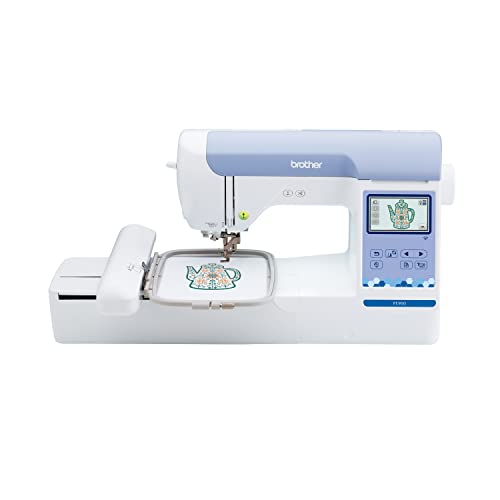
The PE900 is Brother’s embroidery-only machine with a 5 × 7 in. field.
Brother’s 4 × 4 machines, the PE545 and SE700, are the step below it. The PE900’s field is 35 sq in. against their 16, so a design up to 7 in. tall fits in one hooping.
Brother lists 193 built-in designs and 13 lettering fonts. The Artspira app adds 50 free downloadable designs, and Brother’s iBroidery site sells more than 5,000 designs one at a time.
Transfer is flexible. It works with Brother’s free Design Database Transfer software over your wireless network, and it has a built-in USB port. In the Artspira app you can draw line-art designs up to 5 × 7 in. on a phone and send them over Wi-Fi.
Its time savers: advanced automatic needle threading, an automatic thread cutter, bobbin and upper thread sensors, Color Sort to cut down color changes, and trimming for jump stitches within a color.
Embroidery runs up to 650 stitches per minute. The 3.7 in. LCD handles letter editing, zoom, resizing, rotating and combining designs. Brother’s table says its brightness doesn’t adjust.
The box has one frame, the 5 × 7 in., plus embroidery foot Q, four bobbins, 90-weight white bobbin thread and a dust cover. Brother says a 4 × 7 in. magnetic frame fits it, with 7.4 in. from the needle to the arm.
The warranty is Brother’s 1/2/25. Brother’s help center says that’s one year on mechanical parts and labor, two years on circuit boards and 25 years on the chassis casting.
My call: if you only want to embroider, this is the first machine to buy. At 17.64 lb it’s light enough to carry to a class.
Pros
5 × 7 in. field, 35 sq in.
193 designs, 13 lettering fonts
Wi-Fi, USB and the Artspira app
Thread cutter and two thread sensors
17.64 lb
Cons
Embroidery only, no sewing
One frame in the box
1/2/25 warranty: 1 year on parts
Screen brightness doesn’t adjust
650 stitches per minute top speed
Buy it if
This is your first embroidery machine, you already own a sewing machine, and you want designs up to 7 in. tall.
Skip it if
You want one machine for sewing too. The SE2000 embroiders the same 5 × 7 field and sews.
A sewing and embroidery machine
One machine that sews and embroiders the same 5 × 7 in. field as the PE900.
Best for sewing and embroidery in one machine
Brother SE2000
The SE2000 is Brother’s sewing and embroidery combination. It embroiders the same 5 × 7 in. field as the PE900 and sews with 241 built-in stitches.
On the embroidery side it matches the PE900 almost line for line: 193 built-in designs, 13 embroidery lettering fonts, up to 650 stitches per minute, a 3.7 in. color LCD and 7.4 in. from needle to arm. Brother says the 4 × 7 in. magnetic hoop fits it too.
The sewing side adds 10 styles of one-step auto-size buttonholes, 5 lettering fonts for sewn letters and My Custom Stitch, which saves stitches you design. It sews at up to 850 stitches per minute.
The box holds eight presser feet: zigzag J, monogramming N, overcasting G, zipper I, blind stitch R, button fitting M, buttonhole A and embroidery Q. A knee lifter, a foot controller, a twin needle and an eyelet punch come too.
Transfer is wireless, with Brother’s free Design Database Transfer software and the Artspira app. The Amazon listing also mentions a built-in USB port, and Brother’s table says the USB cable isn’t included.
It threads the needle automatically and has an automatic thread cutter. Color Sort and jump stitch trimming work the same way they do on the PE900.
Weight is the one figure to double-check. Brother’s table says 20.5 lb, while Amazon lists 38 lb. Brother’s number is the machine’s own spec, so I go by it.
The warranty is the same 1/2/25.
My call: buy it if you’ll sew and embroider and want one machine on the table. If you’ll only embroider, the PE900 does the same work.
Pros
Sews: 241 stitches, 10 buttonhole styles
Same 5 × 7 in. field as the PE900
Eight presser feet and a knee lifter
Wi-Fi and the Artspira app
Cons
1/2/25 warranty: 1 year on parts
USB cable not included
Weight listed as 20.5 or 38 lb
650 stitches per minute embroidering
One embroidery frame in the box
Buy it if
You’ll sew and embroider, you don’t own a sewing machine you love, and one machine on the table suits your space.
Skip it if
You already sew on another machine. The PE900 does the same embroidery without the sewing side.
The four picks compared
From Brother’s spec tables and product pages. On a phone, each pick becomes its own card.
Only the NQ1700E pairs a field over 5 × 7 in. with Wi-Fi. Only the PRS100 has a free arm for caps and sleeves, and only the SE2000 sews.
Pick by budget and project
The four picks in price order, from the Amazon prices when I rechecked the listings. Each card shows today’s price.
Price order on Nov 11, 2026
Machine
Field
What the step up buys
Lowest of the four
Brother PE900
5 × 7 in.
Embroidery only, Wi-Fi and USB, 17.64 lb
Second
Brother SE2000
5 × 7 in.
The same embroidery plus 241 sewing stitches and 8 presser feet
Third
Brother NQ1700E
6 × 10 in.
A bigger field, 258 designs and the 2/6/25 Premium warranty
Highest
Brother PRS100
8 × 8 in.
A free arm for caps and sleeves, 1,000 spm and 445 designs
The PE900 is the lowest-priced way into a 5 × 7 in. field. Paying more buys sewing first (SE2000), then field size and a longer first warranty term (NQ1700E), then the free arm (PRS100).
Match the money to the project, not the design count. If your largest design fits 5 × 7 in. and you stitch flat fabric, the PE900 or SE2000 covers it. If designs run past 7 in., the NQ1700E is the step that matters. If caps are the main job, only the PRS100 is built for them.
Prices move. The order above is from Nov 11, 2026; each card shows the current Amazon price and when it was checked.
Popular machines I checked and left out
The same checks as the picks: field, built-in designs, fonts, warranty and how designs get on.
Machine
What held it back
What it does well
Singer SE9180
Included hoop 170 × 100 mm, about 26 sq in.; 150 designs; warranty starts at 90 days
Sews too: 250 stitches, 7 in. touch screen
Brother PE545
4 × 4 in. field, 16 sq in.; 135 designs; 10 fonts
Wi-Fi and USB, thread sensors, 14.07 lb
Brother SE700
4 × 4 in. field, 16 sq in.; 135 designs; 10 fonts
Sews too: 103 stitches, 710 spm sewing
Janome MC550E
No warranty term on Janome’s page; 6 fonts; USB only
Largest field I read: 7.9 × 14.2 in.
Brother Skitch PP1
Runs only through the Artspira app; no designs on the machine; 4 × 4 in.
4 × 4 in. magnetic frame in the box
The PE545 and SE700 are Brother’s 4 × 4 entry machines. They’re left out for one main reason: a 4 × 4 in. field holds less than half of a 5 × 7. Both have Wi-Fi, an automatic thread cutter and 135 designs.
The PE900 and SE2000 are the same two ideas, embroidery only and a combo, with the 5 × 7 field.
Janome’s Memory Craft 550E has the biggest field I read, but Janome’s product page showed no warranty term. Singer’s SE9180 sews and embroiders like the SE2000, on a smaller hoop with a 90-day first warranty term.
I’ll check both again at the next update.
How many designs come on each machine
Built-in designs are ready to stitch the day the box opens. App and download libraries come on top.
The PRS100 leads with 445 designs and 21 fonts. The NQ1700E has 258, and the PE900 and SE2000 share the same 193. The two 4 × 4 Brothers have 135, which Brother’s PE545 page breaks into 75 motifs and 60 alphabet and frame designs.
Fonts matter more than the design count if you mostly stitch names.
Beyond the built-ins, Brother’s Artspira app gives the PE900 and SE2000 50 free downloadable designs, and iBroidery sells more than 5,000 designs one at a time. The Skitch has no built-in designs at all; it gets 100 free ones through Artspira.
So a small built-in library isn’t a dead end. It means more downloading.
How designs get onto each machine
Three routes: a USB stick, your home Wi-Fi, or a phone app. Here’s which machine takes which.
Machine
USB
Wi-Fi (Design Database Transfer)
Artspira app
Source
Brother NQ1700E
Yes; cable not included
Yes
Yes
Brother spec table
Brother PRS100
1 port; cable included
No
Not listed
Brother spec table
Brother PE900
Built-in port
Yes
Yes
Brother product page
Brother SE2000
Listing says built-in port; cable not included
Yes
Yes
Brother page and Amazon listing
Brother Skitch PP1 (not picked)
No
No
Required to run it
Brother product page
Design Database Transfer is Brother’s free download for a PC. With the machine on your wireless network, you pick a file and send it, and Brother says no USB stick is needed. Brother also names PE-Design 11 as software for creating and sending your own designs.
On the PRS100, plan on a USB stick or the included cable.
Artspira is Brother’s phone app. On the PE900 and SE2000, Brother says you can draw line-art designs with a pen, shapes and an eraser, preview them in a stitch simulator, and send them up to 5 × 7 in.
On the Skitch, the app isn’t an extra. Brother says it’s required to use the machine.
Embroidery only, combo or multi-needle
The search results mix home machines with shop machines. Here’s what each kind is and which this page covers.
Type
What it does
Example
On this page
Embroidery only, flat frame
Embroiders fabric hooped flat on the bed
PE900, NQ1700E
Picks
Sewing and embroidery
Sews, then embroiders with its embroidery unit
SE2000
Pick
Single-needle free arm
Tubes like caps and sleeves slide over the arm
PRS100
Pick
App-run compact
Runs only through a phone app
Brother Skitch PP1
Left out
Multi-needle
Several needles threaded at once, sold mainly for business
Ricoma
Not covered: a different kind
Every machine on this page has one needle. You change thread by hand at each color stop, and Color Sort on the PE900 and SE2000 reorders a design to cut down those stops.
Multi-needle machines, like Ricoma’s, are a different kind. They need their own checks, so I don’t line them up against home machines here.
What Brother’s model letters mean
Brother’s model letters line up with these types on the machines I read. Every PE and NQ model here embroiders only, and every SE model also sews. The PRS is Brother’s free-arm Persona, and the PP1 is the app-run Skitch.
The number climbs with the field: 545 and 700 are 4 × 4, while 900 and 2000 are 5 × 7.
Model
Brother’s product title
Field
Sews too
PE545
PE545 Embroidery Machine
4 × 4 in.
No
SE700
SE700 Computerized Sewing & Embroidery Machine
4 × 4 in.
Yes
PE900
PE900 Wireless Embroidery Machine
5 × 7 in.
No
SE2000
SE2000 Sewing & Embroidery Machine
5 × 7 in.
Yes
NQ1700E
NQ1700E Dedicated Embroidery Machine
6 × 10 in.
No
PRS100
PRS100 Single-Needle Embroidery Machine
8 × 8 in.
No
PP1
Skitch PP1 Embroidery Machine
4 × 4 in.
No
What 1/2/25 and 2/6/25 mean on a warranty
Brother’s warranties are three numbers. Each covers a different part of the machine for a different number of years.
Warranty
Machines
What it covers
Source
Brother 1/2/25 Year Limited
PE900, SE2000, PE545, SE700, Skitch
1 year on mechanical parts and labor; 2 years on circuit boards; 25 years on the chassis casting
Brother help center
Brother 2/6/25 Year Premium Limited
NQ1700E, PRS100
Named on Brother’s product pages; no breakdown on the pages I read
Brother product pages
Singer 90 day / 2 yr / 25 yr
SE9180 (not picked)
Listed on Singer’s page; terms not detailed there
Singer product page
Janome
MC550E (not picked)
No term shown on the product page I read
Janome product page
The 25 in a Brother warranty is the chassis casting, the machine’s metal frame. Mechanical parts and the labor to replace them get the first number: one year on the 1/2/25 machines.
Read the first number first.
The 2/6/25 Premium warranty on the NQ1700E and PRS100 starts at 2 years. Brother’s pages name it but don’t spell out each part, so ask the seller for the written terms. Check the seller shown on the listing before checkout, since the written terms come from them.
How fast each machine stitches
Speed is the top rate a maker lists in stitches per minute. A dense design runs slower.
Top embroidery speed, stitches per minute
Sources: Brother PRS100 spec table; Brother PE900, SE2000, PE545 and Skitch pages; Janome MC550E page; Singer SE9180 page. Brother publishes no embroidery speed for the NQ1700E or SE700.
The PRS100 is rated to 1,000 stitches per minute in a frame and 600 on a cap. The PE900 and SE2000 list 650 for embroidery. The 4 × 4 PE545 and the Skitch list 400.
The SE700’s 710 is a sewing speed, so I don’t chart it as embroidery.
Speed isn’t one of my main checks, because Brother doesn’t publish it for every machine. For one name on a shirt, the gap between 650 and 1,000 is small. For a full-field design run again and again, it adds up.
If you plan to sell what you stitch, weigh it more.
What comes in each box
From Brother’s carton lists. Frames are the item to check, since the frames you own set the designs you can hoop.
Machine
Frames
Feet
Bobbin thread
Also in the box
Brother NQ1700E
Brother lists none; Amazon: 6 × 10 and 5 × 7 in.
Not listed
Not listed
BES Blue software (this listing)
Brother PRS100
8 × 8, 4 × 4 and four compact frames
Not listed
5 prewound bobbins
USB cable, touch pen, 4 spool caps
Brother PE900
5 × 7 in. only
Embroidery foot Q
90-weight white
Dust cover, 4 bobbins
Brother SE2000
5 × 7 in. only
8 feet: J, N, G, I, R, M, A, Q
60-weight white
Knee lifter, foot controller, twin needle
Brother SE700 (not picked)
4 × 4 in.
8 feet
60-weight white, 3 prewound
Foot controller, dust cover
The PRS100’s compact frames are the odd ones out: 1-5/8 × 2-3/4 in., 2 × 2 in., 1-1/2 × 1-3/4 in. and a portrait 1-5/16 × 2-15/16 in. Brother says they’re made for small items like socks and headbands.
On the flat-bed picks, a single frame means every design is hooped in that one size until you buy another.
Embroidering hats, sleeves and bags
This is the one job that changes which machine to buy.
1
A free arm reaches inside tubes
Brother says the PRS100’s arm reaches caps, sleeves and bags, the spots a flat bed can’t.
2
Caps run slower
Brother rates the PRS100 at 400 to 600 stitches per minute with a cap frame, against 1,000 in a flat frame.
3
Small frames for small pieces
Four compact PRS100 frames start at 1-1/2 × 1-3/4 in. for socks and headbands.
4
Confirm the cap frame
Brother’s in-box list doesn’t name one; the Amazon listing says a cap frame and driver set are included.
5
Flat beds need flat fabric
The PE900, SE2000 and NQ1700E hoop fabric flat, and the Brother pages I read list no cap frame for them.
6
Plan for the weight
At 68.34 lb, the PRS100 stays where you set it up.
If hats are a side project, a flat machine still handles patches you stitch flat and sew on afterward. If caps are the main reason you’re buying, the PRS100 is the only pick here built for them.
Brother also says the PRS100 can stitch Disney characters from iBroidery on caps.
Before you order
Six things to settle before checkout, all from the makers’ pages and the listings above.
1
Measure the largest thing you’ll stitch
Your biggest design sets the field you need: up to 5 × 7 in. for the PE900 and SE2000, 6 × 10 in. for the NQ1700E, 8 × 8 in. for the PRS100. The field is the one limit you can’t upgrade later.
2
Check the table it will sit on
Brother lists 17.64 lb for the PE900, 20.5 lb for the SE2000, 27 lb for the NQ1700E and 68.34 lb for the PRS100. The NQ1700E measures 27.37 in. long with its embroidery arm on.
3
Count the frames in the box
The PE900 and SE2000 come with one 5 × 7 in. frame. Brother lists six frames for the PRS100. For the NQ1700E, Brother shows no in-box list and the Amazon description names a 6 × 10 and a 5 × 7 frame.
4
Confirm the cap frame in writing
If hats are the reason you’re buying the PRS100, ask the seller to confirm the cap frame and driver set, since Brother’s in-box list doesn’t name one.
5
Plan how designs get to the machine
The PE900, SE2000 and NQ1700E take designs over Wi-Fi. The PRS100 is USB only, with the cable in the box. The NQ1700E and SE2000 don’t include a USB cable.
6
Match the model number when it arrives
Check the model on the carton against the order page. The NQ1700E listing’s model field reads NQ1600E while its title says NQ1700E, so look at the box before you set it up.
Where the listings and Brother disagree
Places where an Amazon listing and a maker’s page don’t match, or the maker’s own pages differ.
Topic
One source says
The other says
Go by
NQ1700E fonts
Brother: 13
Amazon bullets: 11 (description: 13)
Brother, 13
PRS100 cap frame
Amazon: cap frame and driver set included
Brother’s in-box list: no cap frame
Ask the seller
PRS100 designs
Spec table: 445
Product text: over 405
Both: 445 in the spec table, over 405 in the text
PRS100 compact frames
Amazon: 1.25 × 1.75 to 2 × 2 in.
Brother: up to 1-5/8 × 2-3/4 in.
Brother’s list
SE2000 weight
Brother: 20.5 lb
Amazon: 38 lb
Brother
SE2000 USB
Amazon: built-in USB port
Brother’s table: no USB row; cable not included
Plan on Wi-Fi
SE2000 fonts
Embroidery tab: 13 fonts
Sewing tab: 5 lettering fonts
Both: two different features
NQ1700E weight
Brother: 27 lb
Amazon: 28 lb
Brother
PE900 designs
Spec row: 193 “featuring Disney/Pixar characters”
Product page: no Disney mention
Ask Brother if you want Disney designs
NQ1700E model number
Listing title: NQ1700E with BES Blue software. Listing’s part number field: NQ1700E
Listing’s model field: NQ1600E
Check the carton and order page
When Brother’s own pages differ, I show both figures, like the PRS100’s 445 and “over 405” designs. When a listing and Brother differ, I go by Brother. For anything that decides the purchase, like a cap frame for a hat machine, ask the seller in writing first.
Which machine fits your projects?
Question
If yes
If no
Will you sew on it as well as embroider?
Brother SE2000
PE900, NQ1700E or PRS100
Will designs run past 5 × 7 in.?
NQ1700E (6 × 10) or PRS100 (8 × 8)
PE900 or SE2000
Are caps, sleeves or bags the main job?
PRS100 free arm
A flat-bed pick
Do you want to send designs over Wi-Fi?
NQ1700E, PE900 or SE2000
PRS100 (USB)
Will you carry it to classes?
PE900, 17.64 lb
PRS100 is 68.34 lb
Does a 2-year first warranty term matter?
NQ1700E or PRS100 (2/6/25)
PE900 or SE2000 (1/2/25)
Start with the biggest thing you’ll stitch, then whether it’s flat or a tube, then how designs get to the machine. The field is the one limit you can’t upgrade later.
For home embroidery on flat fabric, the Brother NQ1700E: a 6 × 10 in. field, 258 built-in designs, 13 fonts, Wi-Fi and USB, and Brother’s 2/6/25-year Premium warranty. For a first machine, the Brother PE900 with a 5 × 7 in. field.
What’s the best embroidery machine for beginners?
The Brother PE900. It has a 5 × 7 in. field, automatic needle threading, an automatic thread cutter, bobbin and upper thread sensors and 193 designs, and it weighs 17.64 lb.
What’s the difference between an embroidery machine and a sewing and embroidery machine?
An embroidery-only machine like the PE900 only embroiders. A combination like the SE2000 also sews, with 241 stitches and 10 buttonhole styles, and embroiders the same 5 × 7 in. field.
Is a 4 × 4 or a 5 × 7 hoop better?
A 5 × 7 in. field holds 35 sq in., more than twice a 4 × 4’s 16. Every design a 4 × 4 stitches fits in a 5 × 7, but not the other way around.
Can a home embroidery machine do hats?
A free-arm machine can. Brother says the PRS100’s arm reaches caps, sleeves and bags, and rates it at 400 to 600 stitches per minute on caps. Confirm the cap frame with the seller, since Brother’s in-box list doesn’t name one.
What is a multi-needle embroidery machine?
A machine with several needles threaded at once, sold mainly for business use by makers like Ricoma. Every machine on this page has a single needle, so you change thread at each color stop.
How do you get designs onto an embroidery machine?
By USB stick, by Wi-Fi with Brother’s free Design Database Transfer software, or through Brother’s Artspira phone app, depending on the model. The PRS100 is USB only.
Do you need software to use an embroidery machine?
Not for the built-in designs. To send files over Wi-Fi, Brother’s Design Database Transfer is a free download, and Brother names PE-Design 11 for creating your own designs.
What does Brother’s 25-year warranty cover?
On Brother’s 1/2/25 warranty, 25 years covers the chassis casting. Mechanical parts and labor are covered for 1 year and circuit boards for 2 years, per Brother’s help center.
Which Brother embroidery machine has the largest field?
Of the Brother machines I checked, the PRS100 at 8 × 8 in., 64 sq in. The NQ1700E is close at 6 × 10 in., 60 sq in., and it adds Wi-Fi.
How fast does an embroidery machine stitch?
The makers’ top figures here run from 400 stitches per minute on the Brother PE545 and Skitch to 1,000 on the Brother PRS100. The PE900 and SE2000 list 650.
What bobbin thread comes with a Brother embroidery machine?
Brother’s carton lists show 90-weight white embroidery bobbin thread with the PE900 and PE545, and 60-weight white with the SE2000 and SE700.
Is the Brother SE700 worth it over the SE2000?
The SE700 has a 4 × 4 in. field and 135 designs; the SE2000 has a 5 × 7 in. field and 193. That field is why the SE2000 is a pick here and the SE700 isn’t.
Which embroidery machine costs the least here?
Of the four picks, the Brother PE900 had the lowest Amazon price when I rechecked the listings on Nov 11, 2026. Its card shows today’s price and when it was checked.
Does the Brother NQ1700E come with frames?
Brother’s product page shows no in-box list for the NQ1700E. The Amazon description says a 6 × 10 in. and a 5 × 7 in. frame come with it, so check the contents when it arrives.
How I pick embroidery machines
How I pick
I picked one machine for each kind of project: large flat designs, caps and sleeves, a first machine, and sewing plus embroidery. I checked nine single-needle home machines from Brother, Singer and Janome and kept the four that match those projects best on field, designs, fonts, warranty and how designs get on.
On Nov 11, 2026, I rechecked each pick’s Amazon listing: new, in stock and winning the buy box. I opened every listing and matched it to Brother’s model.
Fields, designs, fonts, speeds, box contents and warranty terms come from Brother’s spec tables, product pages and help center, and from Singer’s and Janome’s product pages. Where sources disagree, I show both. Nothing on this page is copied from customer reviews.
Why trust me
I’m Isaac Daniels, and I own and edit Plain Buy Guides. Picks are built from the makers’ specs, manuals, and safety-agency guidance.
Every number on this page traces to a named document in the list below. I reread Brother’s pages for the four picks on Nov 11, 2026, and the CPSC recall search for Brother, Singer and Janome sewing and embroidery machines found no recalls that day.
I don’t score or star products. Each pick is matched to the kind of project it suits, with its tradeoff written out.
What I check on every machine
1
Embroidery field
The largest design the machine stitches in one hooping, from the maker’s spec table, in inches and square inches. A bigger field means fewer re-hoopings.
2
Built-in designs
Designs stored on the machine. App and download designs are counted separately; when the maker’s own pages differ, I show both figures.
3
Lettering fonts
Built-in embroidery fonts, the ones you use to stitch names and monograms. Sewing-side fonts on a combo are listed apart.
4
Warranty
Each maker’s published term, read first number first: Brother’s 2/6/25 Premium starts at 2 years, its 1/2/25 at 1 year on mechanical parts and labor.
5
Design transfer
How designs reach the machine: Wi-Fi with Brother’s free Design Database Transfer, the Artspira app, or a USB stick.
6
Listing match
That the Amazon listing is new, in stock and the same model as the maker’s page, with any mismatch shown in the table of disagreements.
Sources
Brother USA, product pages and Specifications tables: NQ1700E, PRS100, PE900, SE2000, SE700, PE545 and Skitch PP1, read Oct 21, 2026; NQ1700E, PRS100, PE900 and SE2000 pages reread Nov 11, 2026
Brother USA help center, answer 54556, Coverage under the 25-year warranty
Singer, SE9180 Sewing and Embroidery Machine product page
Janome, Memory Craft 550E product page
Amazon listings for each pick, opened Oct 21, 2026 and rechecked Nov 11, 2026: condition, stock, title, model field and photo
U.S. Consumer Product Safety Commission recall list via saferproducts.gov, searched for Brother, Singer, Janome, sewing machines and embroidery machines on Nov 11, 2026

 Product photo: Amazon
 Product photo: Amazon
 Product photo: Amazon
 Product photo: Amazon